E
Total: 0h
Add employees, set this week's shifts, and save when you are ready. No account is required to start.
Try Free SchedulerTotals and tips stay with the shift's start date and source week. Review provincial pay allocation and daylight-saving changes separately.
Guest draft: up to 6 employees.
| Employee | Mon Oct 12 | Tue Oct 13 | Wed Oct 14 | Thu Oct 15 | Fri Oct 16 | Sat Oct 17 | Sun Oct 18 | Total | OT |
|---|---|---|---|---|---|---|---|---|---|
E | — | ||||||||
| Daily Totals | — | — | — | — | — | — | — | 0h | |
Est. Pay — account required | Employee 1: •••• | ||||||||
One documented restaurant workflow
The weekly scheduler above stays free in any browser. The app is what the team carries into service: managers publish the week, and employees see it, confirm it, and clock in.
For managers
Publish the week, pin announcements, review timecards and reports, and split tips.
For employees
See your shifts, confirm the published week, clock in, and check your own recorded tips.
Free download for iPhone and iPad · iOS 15.1+
From zero to scheduled in 2 minutes
Step 01
No account. No form. Click once and start building.
Step 02
Type a name, click a cell, set start/end times. Hours update instantly.
Step 03
Daily and weekly totals to the minute — no calculator needed.
Step 04
Download a PDF as a guest. Sign up free to keep schedules, track overtime, estimate pay, and export CSV/XLSX.
Tips calculator
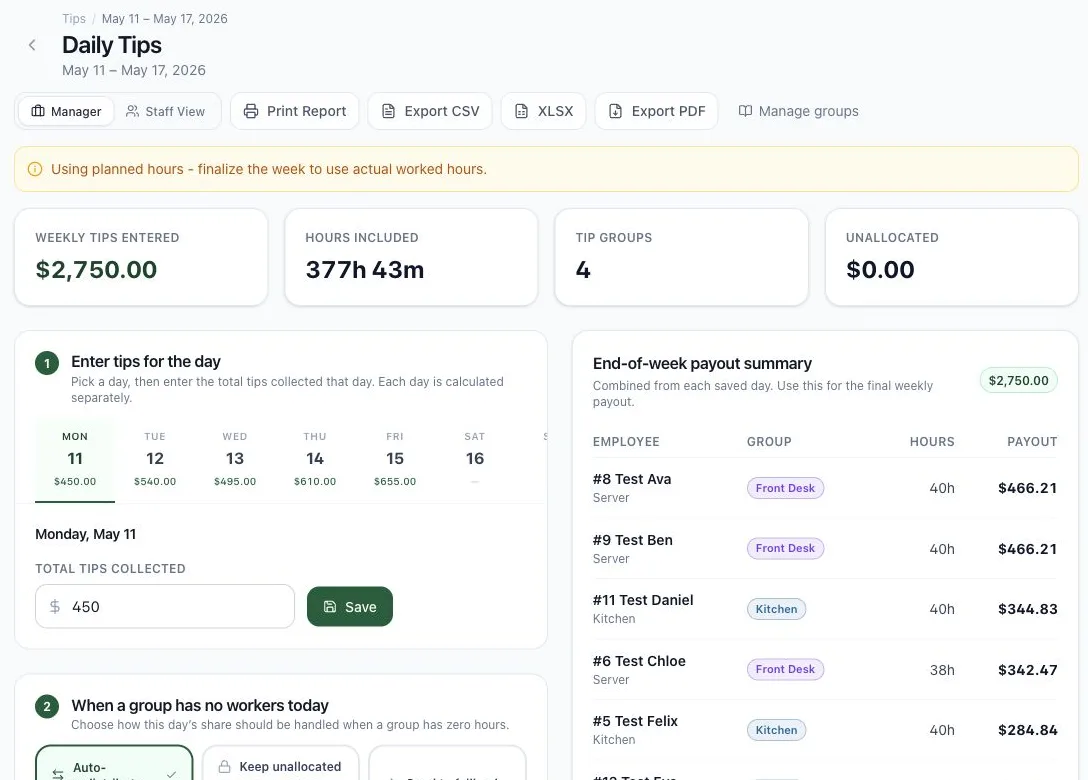
Daily tips can be split by configured groups, worked hours, automatic redistribution, fallback group, or unallocated review.
Start the current week without an account. Create a free account only when you want the schedule to remain editable.
A free account keeps up to 8 weeks of schedule history across devices. The 7-day guest draft stays only in the browser where it was created.
The temporary scheduler stops at 6 people. A free account supports up to 12 active employees without introducing a paid plan.
Download the current week as a PDF now. A free account also adds print-ready PDF, CSV, and XLSX handoff options.
The next constraint is clear: a free account supports up to 12 active employees and 8 weeks of history. Pricing only matters if you later reach that boundary.
Free!
A free account covers schedules, tip distribution methods, payroll estimate preparation, exports, and province-aware review prompts.
Automatic OT flags with configurable thresholds plus province-aware review prompts for Canadian payroll prep.
Estimate regular pay, overtime, gross wages, and review-only province adjustments before export.
Split daily tips by group percentage, hours worked, auto-redistribution, fallback group, or keep-unallocated review.
A free account keeps up to 8 weeks of schedule history across devices. The 7-day guest draft stays only in the browser where it was created.
The temporary scheduler stops at 6 people. A free account supports up to 12 active employees without introducing a paid plan.
Download the current week as a PDF now. A free account also adds print-ready PDF, CSV, and XLSX handoff options.
Holidays can change service hours, orders and staff availability, not just pay. Test the planning scenarios against your own bookings and past results.
Business and coverage check
Our 2026 planning view, low confidence: if regulars gather at home, a Chinese or Japanese restaurant could have normal-to-softer dine-in demand, with work shifting toward takeout or surrounding days. Strong bookings, pre-orders, visitors or nearby closures could offset it. Cuisine alone cannot choose the scenario; use your own history before changing coverage.
These are planning hypotheses, not measured forecasts or guarantees of sales or staffing needs. Maxuod Shift does not predict your demand. Use your own records and current local conditions; review employment rules and agreements before changing shifts. This is not legal or financial advice.
Historical evidence and our outlook (English)Illustrative 2026–2027 roster, not customer data or a staffing recommendation. Select a dot to inspect another dated week; holiday eligibility and substitute days require separate review.
Free tools for small teams, restaurants, cafés, and retail businesses.
Add employees, plan weekly shifts, see hour totals, and download a PDF.
Enter real shifts and see daily, employee, and team hour totals immediately.
Review weekly overtime thresholds, multipliers, and labour-cost planning guidance.
Split tips by hours or role percentages and export exact-cent results.
Compare actual and scheduled labour using sales, wages, employer costs, tips, and paid hours.
Latest operator notes
Labour rules, scheduling habits, and payroll handoff notes from the Maxuod Shift blog.
Already use Square? Compare its POS-connected staff workflow with an independent schedule-to-export tool, including owner counting and a CAD cost example.
Compare Maxuod Shift, 7shifts, TipHaus and TipMetric by manual inputs, POS fit, reviewable reports and Canadian payout questions before buying.
Enter one overnight restaurant shift, check next-day coverage, and keep planned clock hours separate from actual time, daylight saving and payroll review.
Build this week without an account. Create a free account only when you want to keep editing next week.
Download this week now. Keep editing next week with a free account.