
E
Total: 0h
See who opens, who works the rush and who closes. Build the week in your browser, check scheduled hours and share a PDF without creating an account.
Try the free shift schedulerAdd an employee, then pick a day to add their first shift.
Totals and tips stay with the shift's start date and source week. Review provincial pay allocation and daylight-saving changes separately.
Guest draft: up to 6 employees.
| Employee | Mon Nov 23 | Tue Nov 24 | Wed Nov 25 | Thu Nov 26 | Fri Nov 27 | Sat Nov 28 | Sun Nov 29 | Total | OT |
|---|---|---|---|---|---|---|---|---|---|
E | — | ||||||||
| Daily Totals | — | — | — | — | — | — | — | 0h | |
Est. Pay — account required | Employee 1: •••• | ||||||||
One documented restaurant workflow
The weekly scheduler above is free to use in a browser. In the app, managers publish the week and employees can view it, confirm it, and clock in.
For managers
Publish the week, pin announcements, review timecards and reports, and split tips.
For employees
See your shifts, confirm the published week, clock in, and check your own recorded tips.
Build a weekly schedule
Step 01
Open the tool without creating an account or filling out a form.
Step 02
Type a name, click a cell, set start/end times. Hours update instantly.
Step 03
Daily and weekly totals to the minute — no calculator needed.
Step 04
Download a PDF as a guest. Sign up free to keep schedules, track overtime, estimate pay, and export CSV/XLSX.
Tips calculator
Split daily tips using configured groups and hours worked. Review any automatic redistribution, fallback group, or unallocated amount.
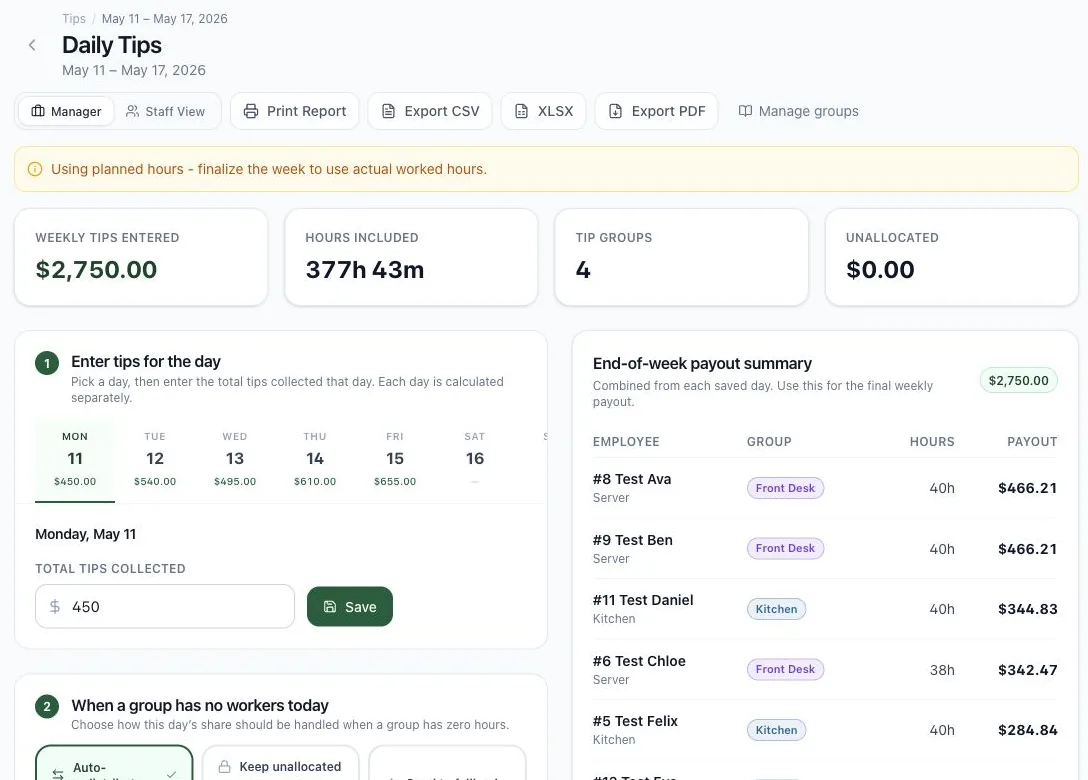
Start the current week without an account. Create a free account only when you want the schedule to remain editable.
A free account keeps up to 8 weeks of schedule history across devices. The 7-day guest draft stays only in the browser where it was created.
The temporary scheduler supports up to 6 people. A free account supports up to 12 active employees.
Download the current week as a PDF now. A free account also adds print-ready PDF, CSV, and XLSX handoff options.
A free account supports up to 12 active employees and 8 weeks of history. Check pricing if you later need more.
Put opening, service and closing shifts on one weekly schedule. Check who is on at each point in the day and adjust the schedule where you need more coverage.
See the planned totals on the schedule. Separately, enter actual start and end times and unpaid breaks in the hours calculator to work out the hours someone worked.
Share a PDF or print it. A free account saves recent schedules and lets you export schedule records as CSV or Excel for review.
Free tools for small teams, restaurants, cafés, and retail businesses.
Add employees, plan weekly shifts, see hour totals, and download a PDF.
Enter real shifts and see daily, employee, and team hour totals immediately.
Split tips by hours or role percentages and export exact-cent results.
Compare actual and scheduled labour using sales, wages, employer costs, tips, and paid hours.
Build this week without an account. Create a free account only when you want to keep editing next week.
Download this week now. Keep editing next week with a free account.