
By Deeyoung MaLinkedInWebsiteJuly 17, 202610 min readScheduling OperationsReviewed July 17, 2026
Monthly Work Schedule Maker for Employee Shifts
Use a monthly work schedule maker to map four weeks of demand, leave, weekend coverage, and review status, then publish detailed shifts one week at a time.
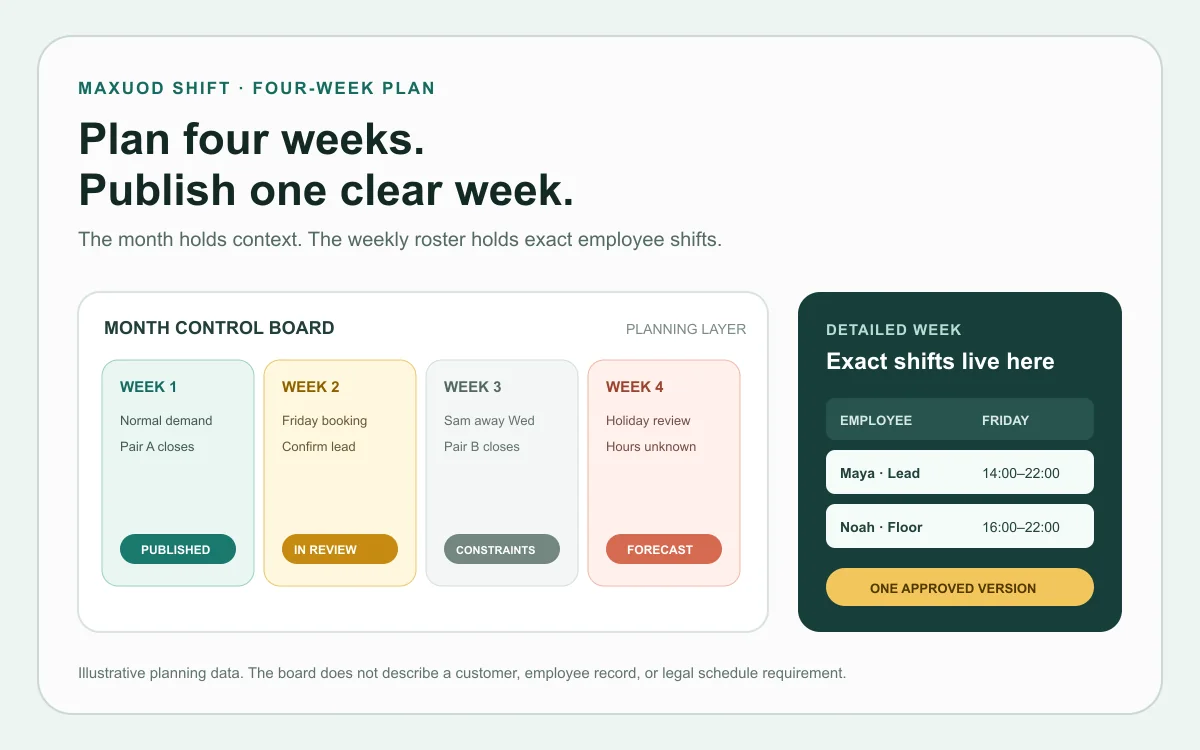
A monthly work schedule maker should help a manager look ahead without pretending every future shift is final. For an hourly team, the month and the week solve different jobs: the month holds known constraints and coverage decisions, while the weekly schedule holds the exact shifts employees are expected to work.
Trying to publish four detailed weeks at once often creates false certainty. A booking changes, leave is approved, a delivery moves, or one employee becomes unavailable. The manager then has four stale schedules instead of one current schedule and a useful plan.
My default is simple: map four weeks, build one week, and publish one approved version. The four-week planning view carries the month-level facts. An online shift schedule maker carries the start times, end times, employee hours, and final handoff for the next week.
The month view should answer four planning questions
Keep the month layer small enough to review in one meeting. For each week, record expected demand, approved constraints, the person or team responsible for hard-to-fill coverage, and the schedule status.
| Planning field | Week 1 | Week 2 | Week 3 | Week 4 |
|---|---|---|---|---|
| Demand marker | Normal service | Friday group booking | Inventory delivery | Holiday review |
| Approved constraint | None recorded | Lead training Tuesday | Sam away Wednesday | Hours still unconfirmed |
| Coverage owner | Pair A closes | Manager confirms Friday | Pair B closes | Not assigned |
| Status | Published | Manager review | Constraints only | Forecast only |
The labels matter. Published means employees can rely on that version. Manager review means the detailed week exists but is not final. Constraints only means the manager has recorded facts but has not assigned shifts. Forecast only means the business is looking ahead, not making a promise.
A four-week board prevents premature scheduling
Consider a fictional eight-person cafe. Week 1 is ready to publish. Week 2 has a large Friday booking, but the booking time may still change. Week 3 includes one approved absence. Week 4 contains a holiday that the manager still needs to review.
Filling every shift today would not make the cafe more prepared. It would bury three unresolved decisions under exact-looking times. The monthly board keeps those decisions visible and assigns an owner before the weekly grid is built.
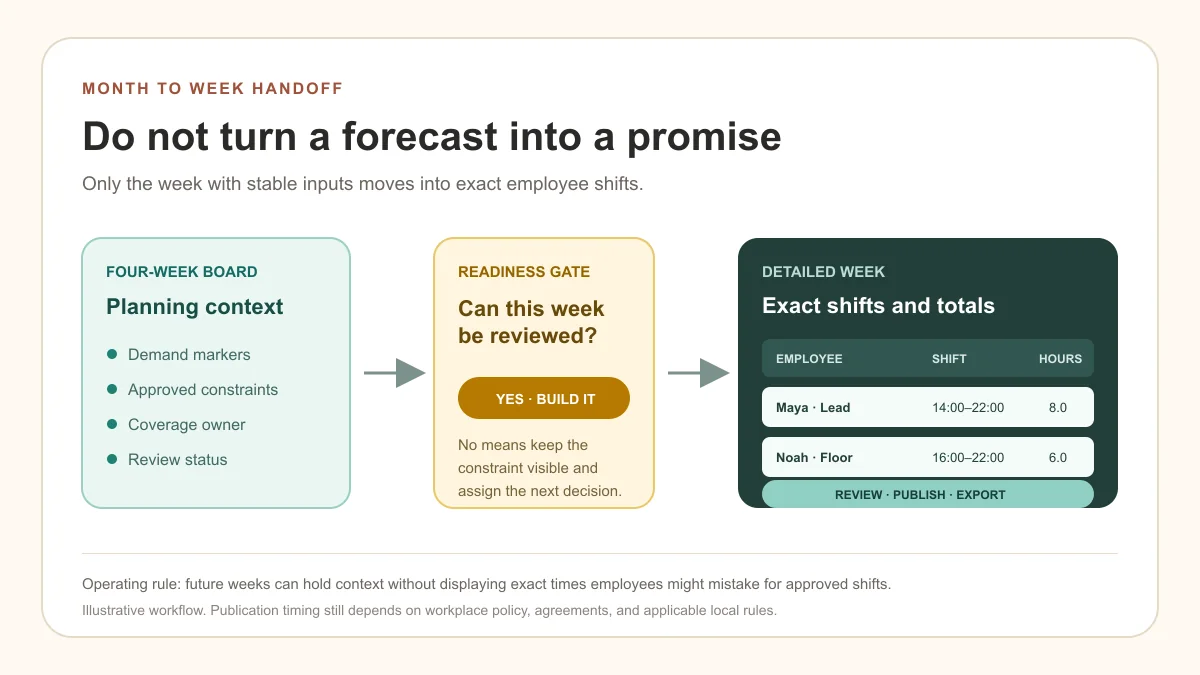
The board also exposes dependencies. Week 2 cannot move to manager review until Friday demand is confirmed. Week 3 cannot be built until the closing pair is settled. Week 4 should remain a forecast until operating hours and the applicable holiday treatment have been checked.
Build and publish one detailed week at a time
Move the next stable week from the board into the schedule. The order below is small enough to repeat and strict enough to catch missing inputs.
- Confirm operating hours, demand changes, approved leave, and day-level availability for the week.
- Write the required coverage by role or responsibility before assigning employee names.
- Add exact start and end times, including separate entries for split shifts.
- Review employee totals, daily coverage, close-to-open turns, and any hours that need an overtime check.
- Publish or export one approved version, then update that version when an accepted change occurs.
The full how to make a shift schedule tutorial explains each weekly check in more detail. The monthly work schedule maker has a narrower job: decide which week is ready to enter that process.
What Maxuod Shift actually carries
The public Maxuod Shift free online shift schedule maker opens on the current week and allows navigation through four future weeks. A guest can add up to six employees, enter shifts, review hour totals, and download a PDF. The same browser keeps employee names and shifts locally for 7 days after the last edit, but this is not saved account history, cross-device sync, or a monthly calendar.
A free account supports up to 12 active employees and keeps eight weeks of schedule history. It adds employee records, roles, day-of-week availability, overtime review, tips, pay estimates, print/PDF, and CSV/XLSX exports. Availability is a visual day cue. It does not store exact availability time windows or stop a manager from assigning a shift.
Maxuod Shift also does not generate a month automatically, validate required role coverage, decide staffing levels, or determine whether a schedule meets every rule that applies. The manager supplies those decisions. The product records the approved weekly result and keeps its totals and handoff files together.
A month grid becomes unreliable when it carries too much
A 31-column employee grid looks complete, but it is hard to read once each cell contains start time, end time, role, break, note, and change status. The manager loses the ability to scan one day vertically for coverage and one employee horizontally for weekly hours.
A monthly total cannot settle payroll treatment. Overtime and premium-pay rules vary by jurisdiction and work period, so keep exact weekly totals visible, check the current Canadian overtime and holiday sources, and send the final treatment to the appropriate payroll or accounting review.
Use a true monthly grid when the work is date-based and low detail, such as leave, training, events, or broad rotation ownership. Use the weekly schedule when employees need exact shift times and managers need to inspect coverage and hours.
Choose the lightest workflow that preserves the record
A printable four-week board is enough when one manager needs to track leave, events, and which week is ready. A guest scheduler fits a temporary week that needs totals and a PDF. A free saved account fits a recurring small-team workflow where employee records, weekly history, roles, tips, estimates, and exports need to stay connected.
Use a broader workforce platform when the operation requires automatic scheduling, complex time-off approvals, deep POS or payroll integrations, multi-location controls, or advanced permissions. The extra setup is justified only when the business needs those functions.
The decision is not monthly versus weekly software. It is whether each planning fact has one owner, each published week has one current version, and later changes can be traced without reconstructing the month from messages.
Plan four weeks; promise one week
Use the month to record what is known, what is unresolved, and who owns the next decision. Move a week into detailed scheduling only when its inputs are stable enough to review.
That is the useful boundary for a monthly work schedule maker: four weeks of planning context, followed by one clear weekly schedule employees can rely on.
FAQ
What should a monthly work schedule maker include?
Use the month view for demand markers, approved leave or other known constraints, weekend or hard-to-fill coverage ownership, and the status of each week. Keep exact employee start and end times in a detailed weekly schedule.
Is a monthly or weekly employee schedule better?
A monthly view is better for leave, events, training, broad coverage ownership, and future review status. A weekly view is better for exact shifts, role coverage, employee hours, handoffs, and the version employees are expected to follow.
Can Maxuod Shift create a monthly employee schedule?
Maxuod Shift is a weekly scheduler. Guest mode can move from the current week through four future weeks during one browser session, while a free account saves weekly schedules and keeps eight weeks of history. It does not generate one automatic monthly roster.
Does the free monthly planning workflow save my schedule?
The four-week planning view can be used as a planning reference, and the same browser keeps guest employee names and shifts locally for 7 days after the last edit. This is not account history or cross-device sync. Create a free account when employee records and weekly schedules need to remain available; Free supports up to 12 active employees and eight weeks of history.
How far ahead should a small team publish employee shifts?
Plan future constraints as early as useful, but publish exact shifts only when the inputs are stable enough to review. Notice requirements, workplace policies, agreements, and local employment rules can affect the appropriate publication timing.
Written as an operator checklist, not legal or payroll advice. Confirm local rules before changing pay, holiday, or tip policies.
Related guides
How to Make a Shift Schedule: A 7-Step Small-Team Workflow
Learn how to make a shift schedule in seven practical steps, then choose a free online shift schedule maker for weekly or monthly planning.
Free Shift Schedule Templates: Blank PDF Download
Download a blank shift schedule template PDF for weekly planning, then use a free Maxuod Shift account when you need saved schedules and PDF, CSV, or XLSX exports.
Weekly Restaurant Schedule Review: A 20-Minute Walkthrough
Review a restaurant schedule in 20 minutes with a worked walkthrough for coverage, availability, fairness, hours, backups, and payroll handoff.
Build the schedule before the week gets loud
Maxuod Shift keeps employee availability, overtime risk, payroll estimates, and tip distribution in the same place for small restaurant teams.